
Fake QR Code Scams: 11 Dangerous Warning Signs You Must Know
Fake QR code scams are becoming one of the easiest ways for scammers to trick people because QR codes look simple, quick, and harmless. We scan QR codes for payments, restaurant menus, parking, deliveries, websites, offers, tickets, and even customer support. But the problem is this: you cannot always see where a QR code will take you before you scan it.
A fake QR code can send you to a fraud payment page, a fake login page, a malicious app download, or a scam website that looks real. In India, QR scams are especially risky because people use UPI payments daily, and many users still do not clearly understand when they need to enter a UPI PIN and when they should not.
The FTC warns that scammers can hide harmful links inside QR codes, leading people to fake websites that steal information or install malware.
You can read the FTC’s official QR code scam warning for more safety tips.
The FBI has also warned about QR codes used in unsolicited packages to steal personal and financial details or download malicious software.
In this guide, you will learn how fake QR code scams work, where scammers place fake QR codes, how UPI QR scams happen, warning signs to check, and what to do if you accidentally scan a suspicious QR code.
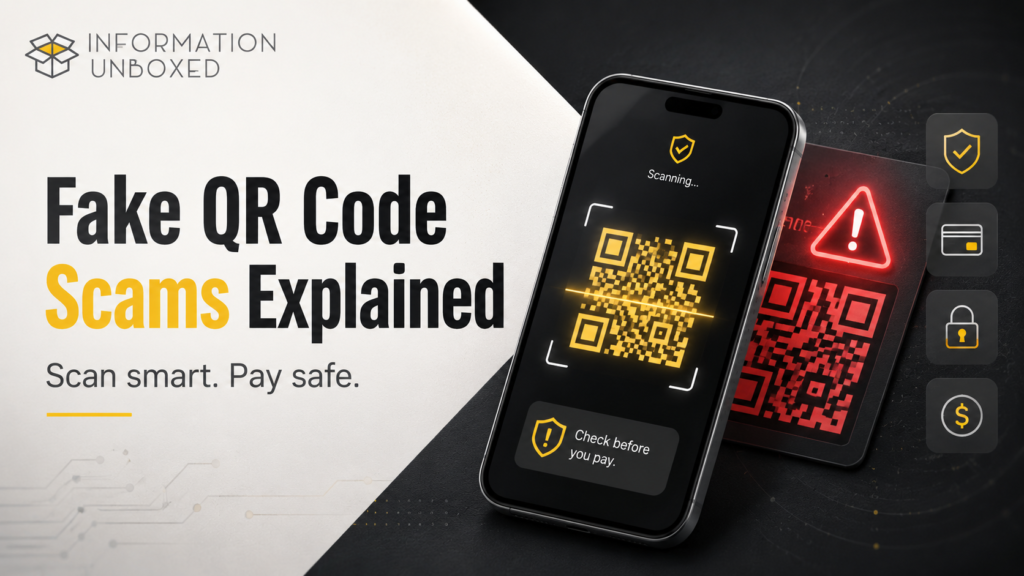
What Is a Fake QR Code Scam?
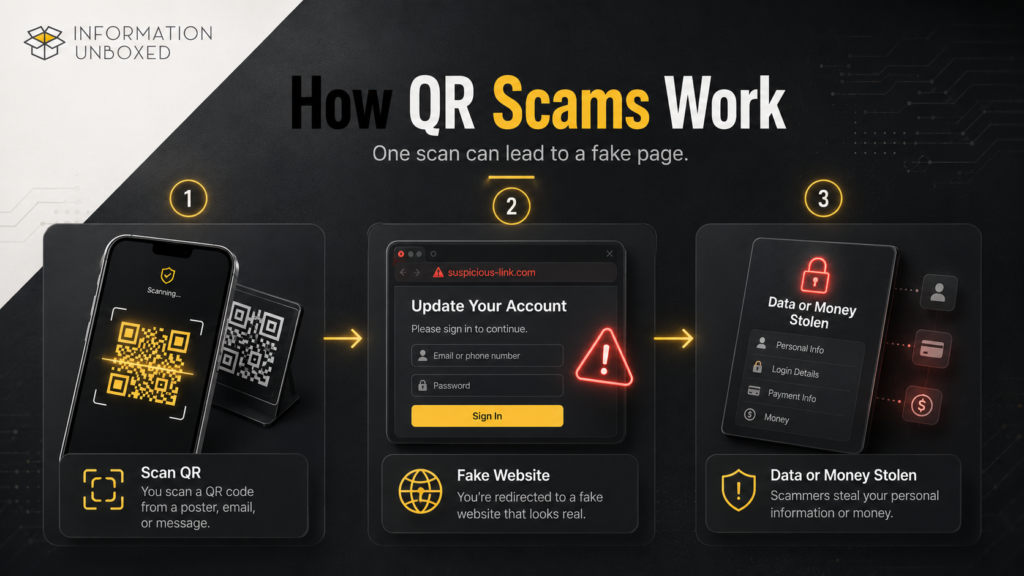
A fake QR code scam happens when a scammer uses a QR code to mislead you into opening a dangerous link, making a wrong payment, sharing personal details, logging into a fake account, or downloading a harmful app.
The QR code itself may look normal. The scam is hidden in the destination behind it.
A fake QR code may lead to:
- A fake payment page
- A fake UPI collection request
- A phishing website
- A fake bank login page
- A fake delivery tracking page
- A fake customer support page
- A malware download
- A fake offer or coupon page
- A fake parking or restaurant payment page
This type of scam is also called quishing, which means QR-code phishing.
Why Fake QR Code Scams Are Dangerous
QR scams work because people scan quickly and trust what they see. A QR code looks technical, official, and convenient. Scammers take advantage of that.
Fake QR code scams are dangerous because:
- You cannot read the QR code visually
- The scam page may look like a real brand page
- People scan in a hurry
- QR codes are common in payment locations
- Fake stickers can be pasted over real QR codes
- Scammers create urgency using offers, refunds, or delivery issues
You may also like our guide on how to stop spam calls on Android and iPhone to stay safer from phone-based scams.
- People may enter UPI PIN without understanding the transaction
A research study on QR phishing found that QR codes can be an effective phishing method because people are drawn to their convenience and may scan professionally designed QR codes more readily.
1. Fake Payment QR Codes
This is one of the most common fake QR scams. A scammer replaces a real QR payment code with a fake one. When you scan it, the payment may go to the scammer instead of the real shop, restaurant, parking counter, or service provider.
Where This Can Happen
- Shops
- Cafes
- Petrol pumps
- Parking lots
- Street vendors
- Donation boxes
- Event counters
- Small businesses
- Fake charity campaigns
How to Stay Safe
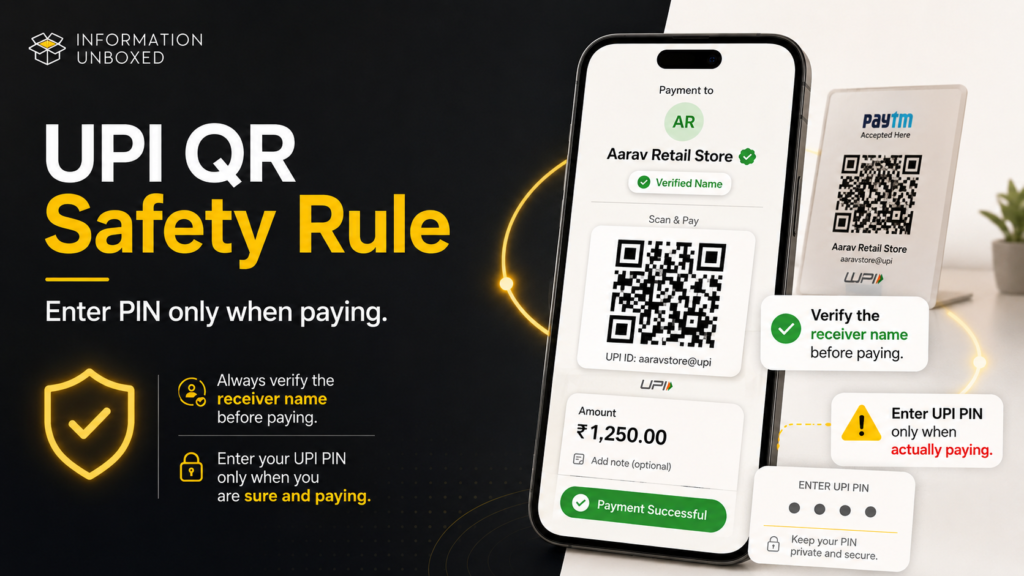
Before paying, always check the receiver name on your UPI app. If the name looks unrelated to the shop or person you are paying, stop and confirm.
Important rule:
A QR code for payment should show the correct receiver name before you enter your UPI PIN.
2. “Scan QR to Receive Money” Scam
This is a very common UPI-related scam. A scammer may say they are sending you money and ask you to scan a QR code to receive it.
But in UPI, you generally do not need to enter your UPI PIN to receive money. Entering your UPI PIN usually means you are authorizing a debit from your account, not receiving money.
Example
A scammer says:
“I am sending ₹5,000. Scan this QR code and enter your UPI PIN to receive the money.”
That is a red flag.
What You Should Do
Do not scan QR codes to receive money from unknown people. If someone is sending you money, they can send it directly to your UPI ID or phone number.
3. Fake QR Stickers Over Real QR Codes
Scammers may physically paste fake QR stickers over genuine QR codes. This can happen in public places where payment QR codes are printed and displayed.
Warning Signs
- QR sticker looks newly pasted
- QR code is placed over another code
- Shopkeeper seems unaware of the QR code
- Receiver name does not match the business
- QR code looks damaged or tampered with
What to Do
Before paying, ask the shopkeeper to confirm the receiver name. If possible, pay directly to their UPI ID or phone number instead of scanning a suspicious printed code.
4. Fake Parking QR Code Scams
Parking QR scams are becoming common in many countries. A scammer places a fake QR code on parking meters or boards. When people scan it, they are taken to a fake payment page that steals card or banking details.
Where You May See This
- Parking lots
- Malls
- Airports
- Public parking meters
- Tourist spots
- Event venues
How to Stay Safe
Use the official parking app or website if available. If a QR code takes you to a payment page, check the website address carefully before entering details.
5. Fake Restaurant Menu QR Codes
Many restaurants use QR codes for menus. Scammers may place fake QR codes on tables, flyers, or posters that send users to malicious websites.
What Can Happen
A fake menu QR code can:
- Open a fake website
- Show fake offers
- Ask for login details
- Ask you to download an app
- Collect your personal data
- Redirect you to ads or malware
Safety Tip
A restaurant menu QR code should not ask for your banking details, OTP, UPI PIN, or app installation.
6. Fake Delivery QR Code Scams
Scammers may send fake delivery messages with QR codes. The message may say your parcel is delayed, address verification is needed, or a small payment is required.
The FTC has warned about QR codes in unexpected packages and messages that can lead to phishing websites or malware downloads.
Common Fake Messages
- “Scan to confirm delivery”
- “Scan to pay delivery fee”
- “Scan to update address”
- “Scan to claim your package”
- “Scan to verify order”
What to Do
Do not scan QR codes from unknown delivery messages. Open the official delivery app or website directly and check your order there.
7. Fake Bank or KYC QR Code Scams
A scammer may pretend to be from your bank, wallet, telecom company, or payment app and ask you to scan a QR code to update KYC, unblock your account, or avoid service suspension.
Red Flags
- Urgent KYC warning
- Account will be blocked
- Scan QR to update details
- Enter OTP or PIN
- Install remote access app
- Share screen
- Share Aadhaar, PAN, card, or bank details
Safety Rule
Banks and trusted payment companies will not ask you to scan a random QR code and enter your PIN or OTP to “protect” your account.
8. Fake Offer, Coupon, or Cashback QR Codes
Scammers use fake offers because people love discounts. A QR code may promise cashback, free recharge, free gift, lottery reward, restaurant coupon, or shopping discount.
Example
“Scan this QR code and get ₹1,000 cashback.”
The fake page may ask for:
- Phone number
- UPI ID
- Bank details
- Card number
- OTP
- Login credentials
- App installation
What to Do
If an offer sounds too good to be true, it probably is. Check the official app or website instead of scanning unknown QR codes.
9. Fake QR Codes in Emails and Posters
QR phishing is often used in emails because QR codes can sometimes bypass basic email filters. A scam email may tell you to scan a QR code to log in, verify account activity, download an invoice, or reset a password.
Where Scammers Use These QR Codes
- Emails
- Posters
- Flyers
- Fake invoices
- Fake HR messages
- Fake IT support messages
- Fake event tickets
- Fake subscription renewal messages
Safety Tip
Do not scan QR codes in unexpected emails, especially if they ask you to log in or verify your account.
10. Fake QR Codes That Download Apps or Malware
Some fake QR codes may take you to a page asking you to install an app. This can be dangerous, especially on Android if the app is downloaded outside the Play Store.
The FBI warned that QR codes in unsolicited packages may be used to trick users into downloading malicious software that steals data from their phone.
Never Install Apps From
- Random QR codes
- Unknown websites
- WhatsApp forwards
- Unknown SMS links
- Fake customer support pages
- Prize or cashback pages
Safer Option
Install apps only from Google Play Store or Apple App Store.
11. Fake QR Codes for Customer Support
Scammers create fake customer support pages and ask users to scan QR codes for refund, complaint resolution, or technical help.
Common Scam Lines
- “Scan this QR for refund.”
- “Scan to verify your account.”
- “Scan to receive money.”
- “Scan and enter UPI PIN.”
- “Install this app for support.”
What to Do
Always contact customer support through the official app or official website. Do not trust random QR codes shared by strangers on calls or messages.
How to Identify a Fake QR Code
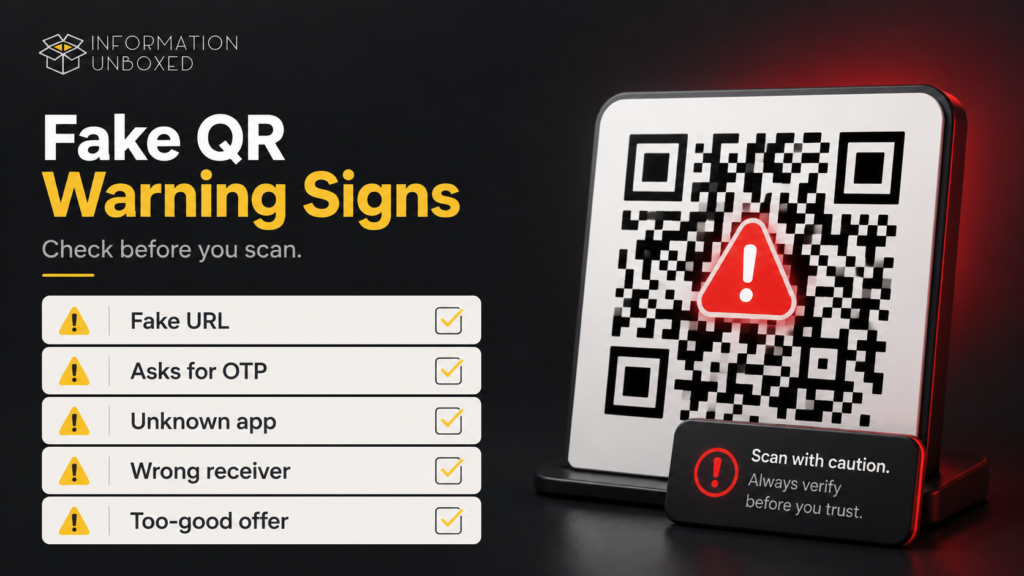
You may not always know a QR code is fake just by looking at it, but you can check these warning signs.
Warning Signs of Fake QR Codes
- QR code is pasted over another code
- Website URL looks misspelled
- Page asks for OTP, PIN, or password
- Page asks you to install an app
- Receiver name does not match the business
- QR code came from an unknown message
- QR code promises unrealistic cashback
- QR code creates urgency or fear
- QR code asks for bank/card details
- QR code is on an unexpected package
- QR code asks you to login again unnecessarily
What to Check Before Scanning a QR Code
Before scanning, ask yourself:
- Do I trust the source of this QR code?
- Is the QR code physically tampered with?
- Does the receiver name match the business or person?
- Is it asking me to enter UPI PIN to receive money?
- Is the website address official?
- Is it asking for OTP, password, or card details?
- Is it asking me to install an app?
- Is the offer too good to be true?
If anything feels suspicious, do not continue.
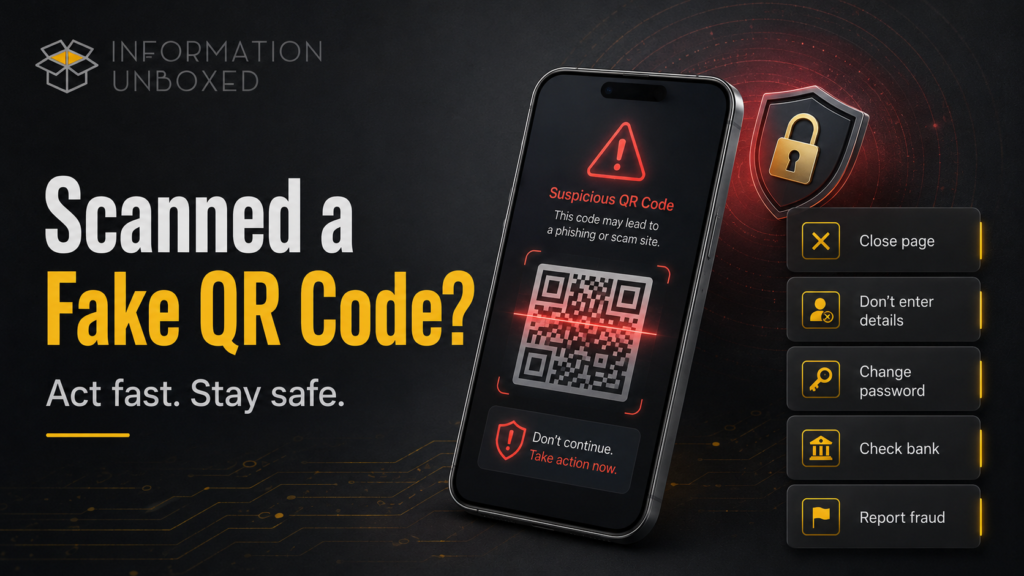
What to Do If You Scanned a Fake QR Code
If you scanned a suspicious QR code, do not panic. Act quickly.
1. Do Not Enter Any Details
If the page asks for OTP, PIN, password, UPI PIN, card details, or banking information, close it immediately.
2. Do Not Install Any App
If the QR code downloads an app or APK file, do not install it.
3. Disconnect and Close the Page
Close the browser tab. If something downloaded, delete it.
4. Change Passwords
If you entered login details, change the password immediately from the official app or website.
5. Check Bank and UPI Transactions
Open your banking app and UPI app. Check recent transactions.
6. Contact Your Bank
If money was deducted, contact your bank immediately and report the transaction.
7. Report Cyber Fraud
In India, report financial cyber fraud quickly through the official cybercrime portal or helpline 1930.
8. Scan Your Phone
Android users should run Play Protect. iPhone users should delete suspicious profiles or apps and update iOS.
UPI QR Code Safety Rules Everyone Should Know
This section is very important for Indian readers.
Rule 1: UPI PIN Is for Sending Money
If you are asked to enter your UPI PIN, you are usually authorizing a payment.
Rule 2: You Don’t Need to Scan QR to Receive Money
If someone wants to send money, they can send it directly to your UPI ID or phone number.
Rule 3: Always Check Receiver Name
Before entering your UPI PIN, check the receiver name carefully.
Rule 4: Do Not Share OTP or PIN
No bank, payment app, or customer support person should ask for your OTP, UPI PIN, or card PIN.
Rule 5: Avoid Payment Through Suspicious QR Stickers
If a QR sticker looks tampered with, ask for another payment method.
NPCI’s UPI safety guidance emphasizes that users should keep their UPI PIN private and be cautious about unknown payment requests.
Common Places Where Fake QR Codes Are Found
Fake QR codes can appear in many everyday places. Here are the most common ones to watch carefully:
1. Parking Meters and Parking Lots
Scammers may place fake QR codes on parking boards or meters to redirect users to fake payment pages. Always check if the payment page looks official before entering any details.
2. Shops, Cafes, and Street Stalls
A fake QR sticker may be pasted over the real payment QR code, sending money to the scammer instead of the business. Before paying, always check the receiver name in your UPI app.
3. Restaurant Tables
Fake menu QR codes can lead to unsafe websites, fake offers, or pages asking for personal details. A restaurant menu QR code should not ask for OTP, UPI PIN, banking details, or app installation.
4. Delivery Messages
Scammers may send QR codes through SMS or WhatsApp claiming you need to confirm delivery, update your address, or pay a small fee. Always check delivery updates through the official app or website.
5. Emails and Fake Invoices
QR codes in unexpected emails can take users to phishing pages that steal login details. Be extra careful with QR codes in emails related to bank alerts, invoices, password resets, or account verification.
6. Posters, Flyers, and Public Boards
Fake QR codes may be added to posters for offers, events, donations, or customer support. Avoid scanning random QR codes from public places unless you fully trust the source.
7. Charity Boxes and Donation Boards
Scammers may replace donation QR codes so the money goes to their own account. Before donating, verify the receiver name and check whether the charity or organization is genuine.
8. Public Wi-Fi Login Boards
Fake QR codes can take users to unsafe Wi-Fi login pages that collect personal data. Use official Wi-Fi networks and avoid entering passwords or payment details on unknown pages.
9. Unexpected Packages
QR codes on unknown packages may lead to scam websites or malicious downloads. Do not scan QR codes from packages you did not order or do not recognize.
10. Customer Support Chats
Fake support agents may send QR codes for refunds, verification, or complaint resolution. Genuine customer support will not ask you to scan a random QR code, enter UPI PIN, share OTP, or install unknown apps.
Fake QR Code Scam Checklist
Use this quick checklist before scanning any QR code:
- Check the source
- Check the URL
- Check the receiver name
- Avoid entering OTP/PIN
- Do not install unknown apps
- Avoid unknown offers
- Do not scan QR codes to receive money
- Report suspicious QR codes
- Use official apps and websites
- Trust your instinct
What Not to Do
Avoid these mistakes:
- Do not scan random QR codes from WhatsApp forwards
- Do not enter UPI PIN to receive money
- Do not scan QR codes from unknown delivery messages
- Do not install APK files from QR links
- Do not trust fake cashback or reward QR codes
- Do not share OTP, PIN, or password
- Do not ignore suspicious receiver names
- Do not continue if the website looks fake
- Do not scan QR codes on unexpected packages
How to Stay Safe From Fake QR Code Scams
Use these habits:
- Scan only trusted QR codes
- Verify receiver name before payment
- Use official apps for payments and bookings
- Avoid QR codes in unknown emails or SMS
- Do not install apps from QR links
- Keep your phone updated
- Use browser safety warnings
- Turn on transaction alerts
- Check bank statements regularly
- Educate family members, especially elders
Final Thoughts
Fake QR code scams are dangerous because they feel normal. We scan QR codes quickly without thinking, especially for payments, menus, parking, deliveries, offers, and support. That is exactly why scammers use them.
The safest habit is simple: pause before you scan. Check the source, check the receiver name, check the website, and never enter OTP, password, card details, or UPI PIN unless you are fully sure what transaction you are approving.
QR codes are useful, but blind scanning is risky. A few seconds of checking can protect your money, phone, and personal information.
FAQs
1. What is a fake QR code scam?
A fake QR code scam happens when a scammer uses a QR code to send you to a fake website, fake payment page, malicious app, or phishing page to steal money or personal information.
2. Can scanning a QR code steal money?
Scanning alone may not always steal money, but if the QR code leads to a fake payment page and you enter UPI PIN, OTP, card details, or login details, you can lose money.
3. Should I scan a QR code to receive money?
No. Be careful if someone asks you to scan a QR code and enter UPI PIN to receive money. Entering a UPI PIN usually authorizes payment from your account.
4. How do I know if a QR code is fake?
Check if the QR code is pasted over another code, leads to a suspicious URL, asks for OTP/PIN, asks to install an app, shows a wrong receiver name, or promises unrealistic rewards.
5. What should I do if I scanned a fake QR code?
Close the page, do not enter details, delete any downloaded file, change passwords if you entered login details, check bank transactions, contact your bank, and report cyber fraud.
6. Are QR codes safe to use?
QR codes are safe when they come from trusted sources. The risk comes from fake or tampered QR codes that lead to scam websites, fake payment pages, or malware downloads.
7. How can I protect my family from QR scams?
Teach them not to scan QR codes from unknown messages, not to enter UPI PIN to receive money, not to install unknown apps, and always check receiver name before payment.


Leave a Reply
Want to join the discussion?Feel free to contribute!